EasySave 1.0 User Guide
Start application
Run the EasySave.exe file
EasySave requires .NET version 6 or higher. It is compatible with the following operating systems:
- Windows 7 and later
- macOS 10.13 and higher
- Linux with distributions based on Debian/Ubuntu or Red Hat/CentOS
On Linux, copy-and-paste keyboard shortcuts are not available, but the application remains usable. On Linux with a graphical interface, the xsel utility must be installed to use Ctrl-C/Ctrl-V shortcuts.
Main menu
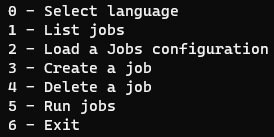
The main menu is displayed :
Keyboard shortcuts
EasySave supports the following keyboard shortcuts:
- CTRL+C : Clear console contents
- CTRL+V : Paste clipboard contents into console. These shortcuts let you quickly interact with the interface without using the mouse.
Choose language
Selects the interface language from among the supported languages.
List jobs
Displays the list of configured backup profiles
Load job configuration
Imports parameters from an existing configuration file
Create job
Configures a new backup profile
Delete a job
Permanently deletes a selected backup profile
Start jobs
Starts manual backups